One click.
Captioned. Uploaded. Submitted. Tracked.
Smart Gallery Hub turns a folder of stock photos and videos into live listings — automatically. AI writes the metadata, the app handles uploads to your stock platforms, and approvals come back to one dashboard. Drop a folder in. Walk away.
Free tier forever · no credit card · Windows & Mac
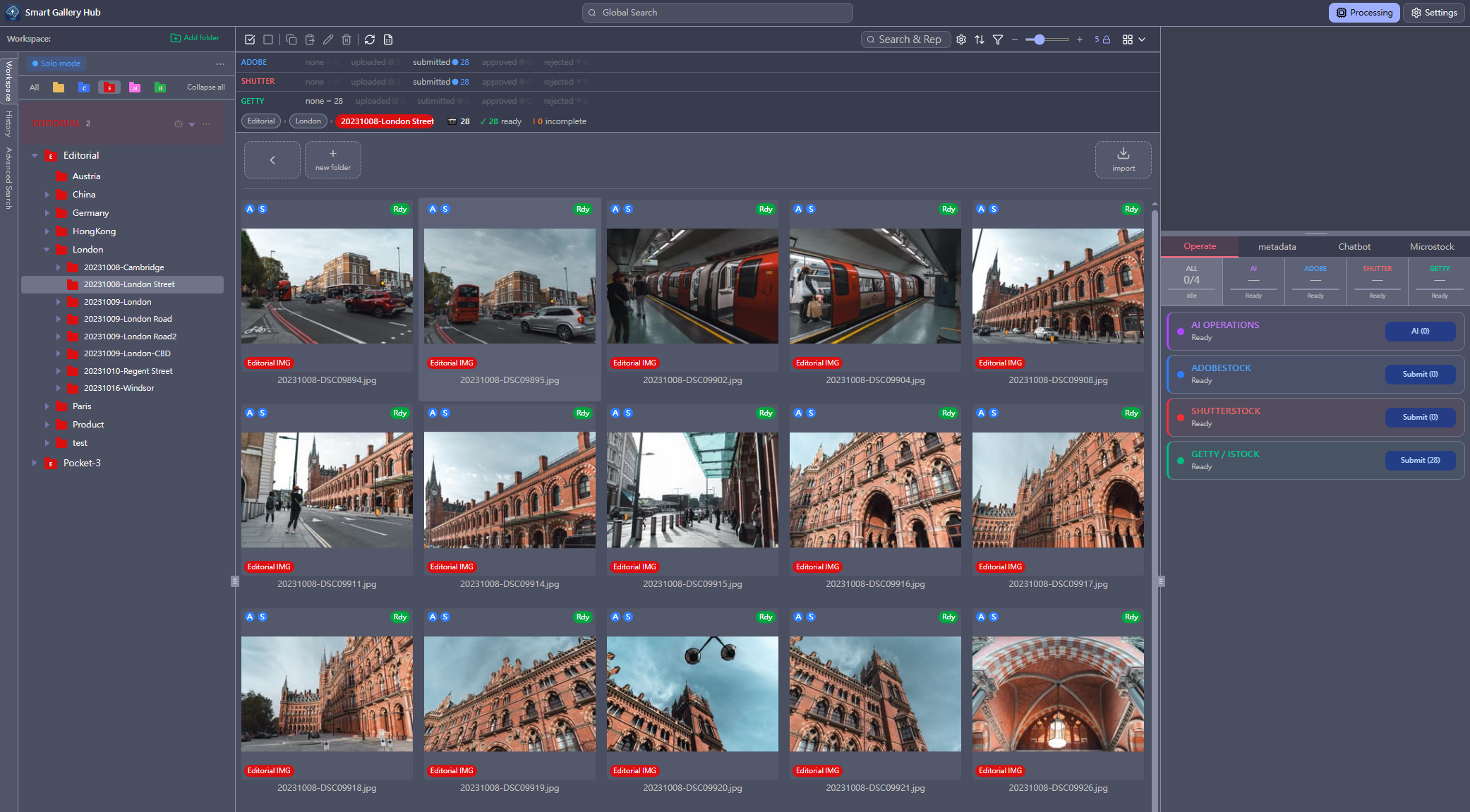
Smart Gallery Hub Pro shown — earnings dashboard and auto-submission require Pro.
What one click actually does.
Smart Gallery Hub writes the description, picks the keywords, organizes by content type, uploads to your stock platforms, and tracks every approval. You drop a folder in. It does the rest.
From folder to live listing, in four steps.
Drop a folder. SGH handles metadata, organization, submission, and tracking.
Add folder, pick content type
Drop a folder into a Commercial, Editorial, AI-Generated, or Illustration workspace. Each workspace applies the right metadata fields and agency category mapping — no more wrong-type rejections.
AI writes the metadata
The AI model generates titles, descriptions, and keywords per file. Optional: drop a hints file in the folder to steer the AI toward more accurate output.
Submit to all three agencies
SGH uploads to Adobe Stock, Shutterstock, and Getty. It retries failures and EXIF-stamps every submitted file to help prevent the same image going out twice.
Enjoy your coffee
SGH keeps submitting, retrying, and tracking approvals in the background. Approvals and earnings roll into one dashboard while you go shoot, edit, or just take a break.
Everything the manual stock photo workflow makes you do.
One desktop app. Three agencies. The full pipeline — AI metadata, submission, tracking, earnings.
AI metadata generation
AI reads each image or video and writes the title, description, and keywords. Editorial content gets a different caption format — the one each agency expects.
Direct submission to Adobe / Shutter / Getty
SGH uploads your files to Adobe, Shutterstock, and Getty and files the submission for you. No dragging files into three different browser tabs.
Submission queue + resume
Sends submissions one agency at a time, retries when something fails, and picks up where it left off after a crash. Drop a thousand files in. Walk away.
Approval & rejection tracking
SGH checks each agency for you and shows what was accepted or rejected — so you don’t need to open three browser tabs to find out.
All earnings, one dashboard
Brings your earnings from Adobe, Shutterstock, and Getty into one chart. See monthly totals, your top-earning files, and which agency pays you the most.
Location-aware AI
When your photo contains GPS data, SGH turns it into a real city + country and feeds that to the AI — for more accurate descriptions, sharper keywords, and the date + city + country prefix every editorial submission needs.
Content-type folders
Label folders as Commercial, Editorial, AI-Generated, or Illustration. Each one gets the right fields and the right category for every agency — so wrong-type submissions get caught before they go out.
Watch folders
Drop new images into a watched folder. SGH picks them up, writes the metadata, and queues them for submission on its own. Set it up once.
Photo & video
Same workflow for stock video. SGH grabs a few frames, lets the AI describe the clip, and submits it to agencies that accept video.
Mobile + remote access
Shoot on your smartphone, import to your home server, and run the full submission — all from your phone. Your desktop does the work in the background.
Export & no duplicates
Export a CSV in each agency’s exact format, or save the metadata straight into the image file. Already-submitted files are remembered — designed to prevent duplicate submissions.
Local-first
Your images stay on your machine. The AI runs on your computer. Nothing uploaded for us to see, nothing trained on your work.
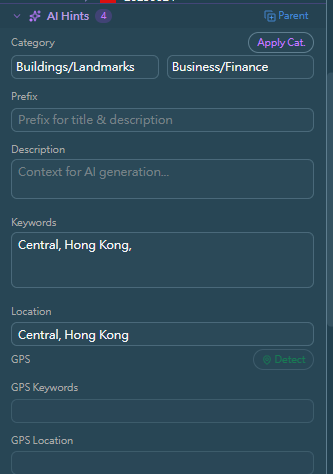
Hints — one setting, sharper results
Set a location (or category, prefix, must-have keywords) once for a folder. The AI uses your hints across every image in the batch — for noticeably more accurate descriptions and keywords.
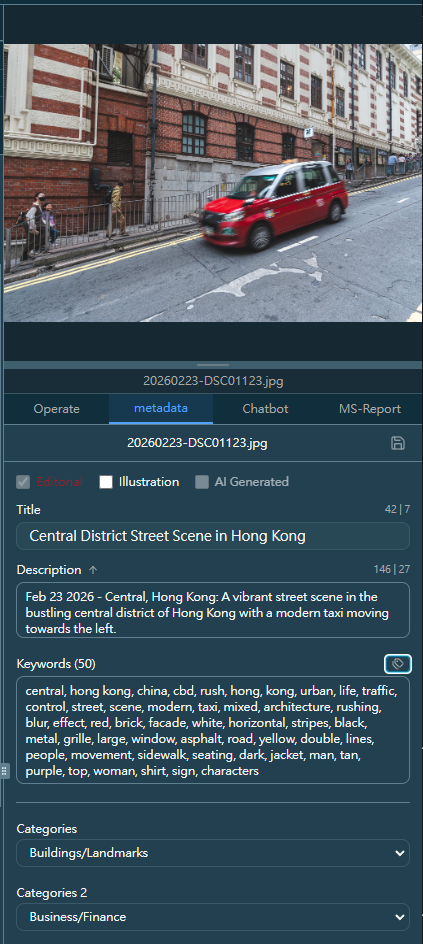
Editorial captions, written by AI
Date, city, country, and a fact-based description — written automatically from GPS and EXIF.

Approval tracking, three agencies
See submitted, approved, and rejected counts for Adobe, Shutterstock, and Getty at a glance.
Out shooting? Run the whole pipeline from your phone.
Import new captures straight to your home server, run the AI metadata, and submit to Adobe Stock, Shutterstock, and Getty — all from the mobile web UI on the same network as your desktop. Your work never leaves the network.
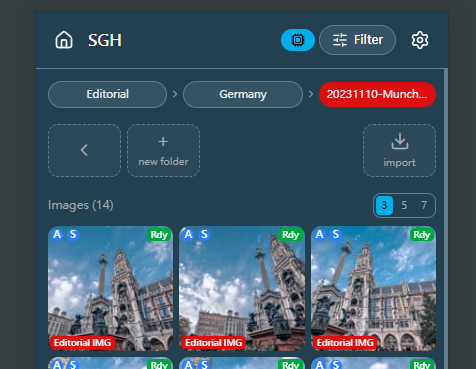
Import to your home server
Tap “Import” on your phone. New shots go straight into the right Editorial or Commercial workspace on your home desktop.
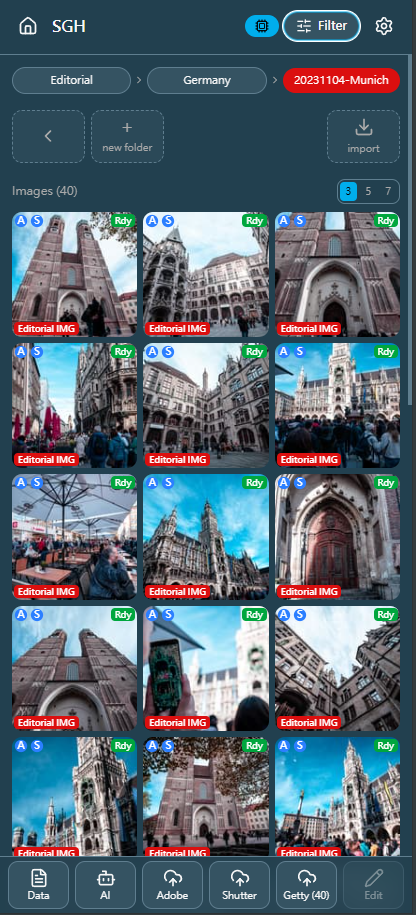
Review on any screen
Browse, filter, and check approvals on your phone or tablet. Same library, same content-type folders, same status badges as on the desktop.
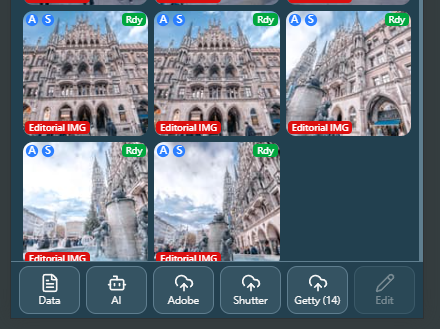
Trigger the full submission
One tap to run AI metadata. One tap to submit to Adobe, Shutterstock, or Getty. The desktop does the heavy lifting in the background.
Mobile access uses the same private network as your desktop — no third-party server, no cloud relay. Your library stays on the machine that owns it.
Only Smart Gallery Hub.
The only local desktop app that ships AI metadata, submission, approval tracking, and earnings — all unlimited, all in one place.
The full feature-by-feature comparison is below.
| Feature |
SGH
all-in-one |
Cloud A
AI keywording |
Cloud B
submission hub |
Cloud C
all-in-one |
Desktop A
metadata editor |
Desktop B
auto-submitter |
Desktop C
all-in-one |
|---|---|---|---|---|---|---|---|
| Platform | Win + Mac | Web | Web | Web | Win/Mac/Linux | Win only | Win + Mac |
| AI metadata generation | ✅1 | ✅2 | ❌ | ⚠ | ⚠3 | ⚠4 | ✅5 |
| AI auto-switches Commercial / Editorial caption style | ✅ | ❌ | — | ❌ | ❌ | ❌ | ❌ |
| Unlimited AI — no per-image fee | ✅ | ❌ | — | ❌ | ❌ | ❌ | ❌6 |
| AI runs locally on your machine | ✅ | ❌ | — | ❌ | ❌ | ❌ | ❌7 |
| Images stay on your machine | ✅ | ❌ | ❌ | ❌ | ✅ | ⚠8 | ⚠7 |
| Auto-submit to Adobe / Shutter / Getty | ✅ | ❌ | ✅ | ✅ | ✅ | ✅ | ✅ |
| Editorial / Commercial type system | ✅ | ❌ | ✅ | ✅ | ✅ | ✅ | ✅ |
| Submission queue with auto-retry & resume | ✅ | — | ⚠ | ✅ | ⚠ | ✅ | ✅ |
| Approval / rejection tracking | ✅ | ❌ | ✅ | ✅ | ❌ | ✅ | ⚠9 |
| Unified earnings dashboard | ✅ | ❌ | ⚠ | ✅ | ❌ | ✅ | ⚠9 |
| Watch folders / hands-free automation | ✅ | ⚠10 | ⚠10 | ✅ | ⚠ | ✅ | ✅ |
| Video support | ✅ | ❌ | ⚠ | ⚠ | ❌ | ⚠ | ✅ |
| GPS → editorial caption auto-fill | ✅ | ❌ | ❌ | ❌ | ❌ | ❌ | ❌ |
| Mobile / remote web access | ✅ | ✅ | ✅ | ✅ | ❌ | ❌ | ❌ |
| One-time lifetime pricing option | ✅ | ❌ | ❌ | ❌ | ❌ | ❌ | ✅ |
|
Yearly cost
~1,000 images / month11 | $59.99 | ~$7712 | ~$12013 | ~$480 | ~$6014 | ~$480 | ~$144 |
| Lifetime | $199 | — | — | — | — | — | $16915 |
Notes
- Local Ollama (free, runs on your own hardware).
- Cloud vision model billed per credit.
- AI keywording behind a paid tier.
- AI keywording runs partly on the vendor’s cloud.
- AI is a separate paid service from the same vendor.
- App is one-time, but AI keywording is metered separately.
- Vendor’s AI runs in the cloud — images uploaded for the AI step.
- Sales tracking flows through the vendor’s cloud.
- Has submission history, but not a unified earnings dashboard.
- Available via third-party plugin.
- Yearly cost estimates assume a moderate-volume contributor processing ~1,000 images per month (~12,000 per year). Actual cost scales with usage and current vendor pricing.
- Credit packs sized to ~12,000 keyword requests per year (e.g. 10,000-credit pack at $59 + 2,000-credit pack at $18).
- Pay-as-you-go at ~$0.01 per upload, ~12,000 uploads per year.
- Pro subscription tier; pricing varies and may include a yearly discount.
- App is a one-time purchase. AI keywording is a separately metered cloud service on top — not included.
Columns anonymized. Each represents the typical capabilities of leading products in that category as of 2026. Individual products may differ.
Your stock photo library stays on your machine.
SGH runs as a desktop app. AI runs locally through Ollama on your CPU or GPU. You pick the model that fits your hardware, with zero cloud cost and no images leaving your computer. We don’t see your images, your metadata, or your agency credentials.
Local Ollama
Free, private, runs offline. Use any vision model that fits your hardware.
Credentials stay local
Agency logins live in a profile folder on your disk. SGH talks to Adobe / Shutter / Getty directly — not through any server of ours.
Pricing for microstock contributors
Start free forever. Upgrade when you want to automate the submission, tracking, and earnings side.
What Pro adds on top of Free
- ✓ Auto-submit to Adobe Stock, Shutterstock, Getty
- ✓ Submission queue with auto-retry & resume
- ✓ Approval / rejection tracking
- ✓ Unified earnings dashboard
- ✓ GPS editorial caption auto-fill
- ✓ Watch folders & full automation
- ✓ Mobile / remote web access
- ✓ CSV export in agency-specific formats
- ✓ Up to 50 keywords written per image
- ✓ Activate on up to 5 devices
Free
$0
Forever · no credit card
- ✓ Unlimited AI metadata generation
- ✓ Content-type folders (Editorial / Commercial / AI / Illustration)
- ✓ Keyword editor with bulk actions
- ✓ Write metadata to file (IPTC/XMP)
- ✓ Photo & video support
- ✓ 30-day free Pro experience, no credit card
Pro Annual
$59.99
per year · ~$5.00/month
- ✓ Everything in Free, plus:
- ✓ Auto-submit to Adobe / Shutter / Getty
- ✓ Approval tracking + earnings dashboard
- ✓ GPS editorial captions + watch folders
- ✓ Mobile / remote web access
- ✓ Up to 50 keywords + CSV export
- ✓ 5 device activation
Pro Lifetime
$199.99
one-time payment · forever
- ✓ Every Pro feature — forever
- ✓ No yearly renewal
- ✓ 5 device activation
- • Pay once — save vs Annual after ~3.3 years
Common questions about Smart Gallery Hub
Which stock photo agencies does Smart Gallery Hub submit to? ▼
Adobe Stock, Shutterstock, and Getty Images / iStock. SGH uploads files via each agency’s native channel (SFTP for Adobe, FTPS for Shutterstock, S3 for Getty) and then drives the contributor portal to file the submission for you.
Do I need a paid AI subscription to use Smart Gallery Hub? ▼
No. SGH ships with a local Ollama integration — download a vision model once and run it on your own CPU or GPU, completely free. The AI runs entirely on your machine, so there is no per-image fee and no cloud subscription.
Does the Free tier really work forever? ▼
Yes. The Free tier is permanent. You can generate AI metadata for unlimited photos and videos, organize them with content-type folders, edit keywords in bulk, write IPTC/XMP metadata back into files, and run the desktop app on one device — all at no cost, forever. On Free, the first 20 keywords per image are written to the file; on Pro, up to 50 are written.
Does Smart Gallery Hub support stock video? ▼
Yes. SGH extracts representative frames from MP4 / MOV / etc., runs the vision model on them, and submits the clips to agencies that accept stock video. The workflow is identical to still photography.
What about my agency passwords — do you store them? ▼
No. Smart Gallery Hub runs entirely on your machine. Agency credentials live in a local browser profile on your disk so the automated portal sessions can log in. Nothing leaves your computer — we have no server that sees your credentials, your images, your metadata, or your earnings.
Which platforms does Smart Gallery Hub run on? ▼
Windows 10 or later (64-bit) and macOS (Apple Silicon and Intel, separate builds). Same feature set on both platforms. Mobile and tablet access is available via the built-in remote web UI, so you can review your library from your phone while your desktop keeps processing.
Stop clicking. Start shipping.
Free forever for AI metadata. 30 days free for the full Pro pipeline. Your stock photos stay on your machine.